Best Wix Alternatives for 2026 (Top Competitors Compared)
.avif)
.png)
.png)

.png)
.png)
.svg)
There is no denying Wix’s appeal. When you’re starting out, you want to see progress fast. And Wix is quick, easy, and reliable minus all the technicalities. As a brand evolves, the website needs an upgrade as it’s not built for what’s in store next.
So, it’s not like people wake up one morning and decide to “leave Wix.” What happens is when the business grows, the website cannot look and feel the same as day 1 anymore.
That’s why in 2026 many teams are exploring Wix alternatives. And with multiple best Wix alternatives, there’s not one “right” replacement, there’s plenty of options. Each platform has its sweet spot.
Here, we’ll break down the best Wix alternatives in 2026 so whether it’s Wix or another website builder, you can swipe right on the perfect match for your needs.
Why People Are Looking for Wix Alternatives in 2026
People are switching from Wix due to a change in how modern team’s work. Today, a website is part of everyday workflow. Something that changes daily. It’s not static anymore where it only gets touched a few times a year. Almost every day there’s a need to tweak, publish, experiment, repurpose, and scale… sometimes all before lunch!
It’s at this moment many realize, ““Oh, our website needs to keep up with how we work now, not how we worked three years ago.”
And here’s where the shift usually happens.
1. Teams evolve from “pages” to “systems”
Many businesses choose Wix to ‘get online, Stat!’ But with time, the website stops functioning like a bunch of pages and becomes more an internal product, which needs structure, scale, and rules.
Suddenly, teams care about:
- A design system that stays intact across 50 pages
- Content variants for campaigns, AB tests, and product updates
- Editing workflows with approvals, drafts, and ownership
2. Performance and control matter more
Wix is known for its simplicity, an experience that’s fast, friendly and smooth. There’s no managing backend logic or code. As businesses grow, they start wanting granular control like more technical SEO control, better performance tuning, and cleaner structure
These are not must-haves for everyone. They’re for “we’re growing fast, and the website needs to keep up” with our needs.
3. The need for “no-friction speed” increases
Wix is great if you few quick updates now and then. But if your company is operating at “Bangalore startup speed,” where marketing, product, and growth teams are shipping nonstop, you need something that works the same way.
This is when you want to:
- Launch 20 landing pages for a campaign
- Test 10 versions in a week
- Restructure a content hub on Friday and ship it Monday
- Run experiments without risking layout breakage
If you think about it, it’s not about Wix not working, it’s about businesses outgrowing their starting point. The same way you eventually outgrow your first CRM, or that spreadsheet that once ran your entire company. It’s a natural step in the business journey, not a judgement on the tool that helped you get started.
Who Should Consider Switching to Competitors of Wix?
People should consider switching from Wix when they start noticing friction in everyday workflows. Different teams reach this moment at different stages, and here’s what that tends to look like.
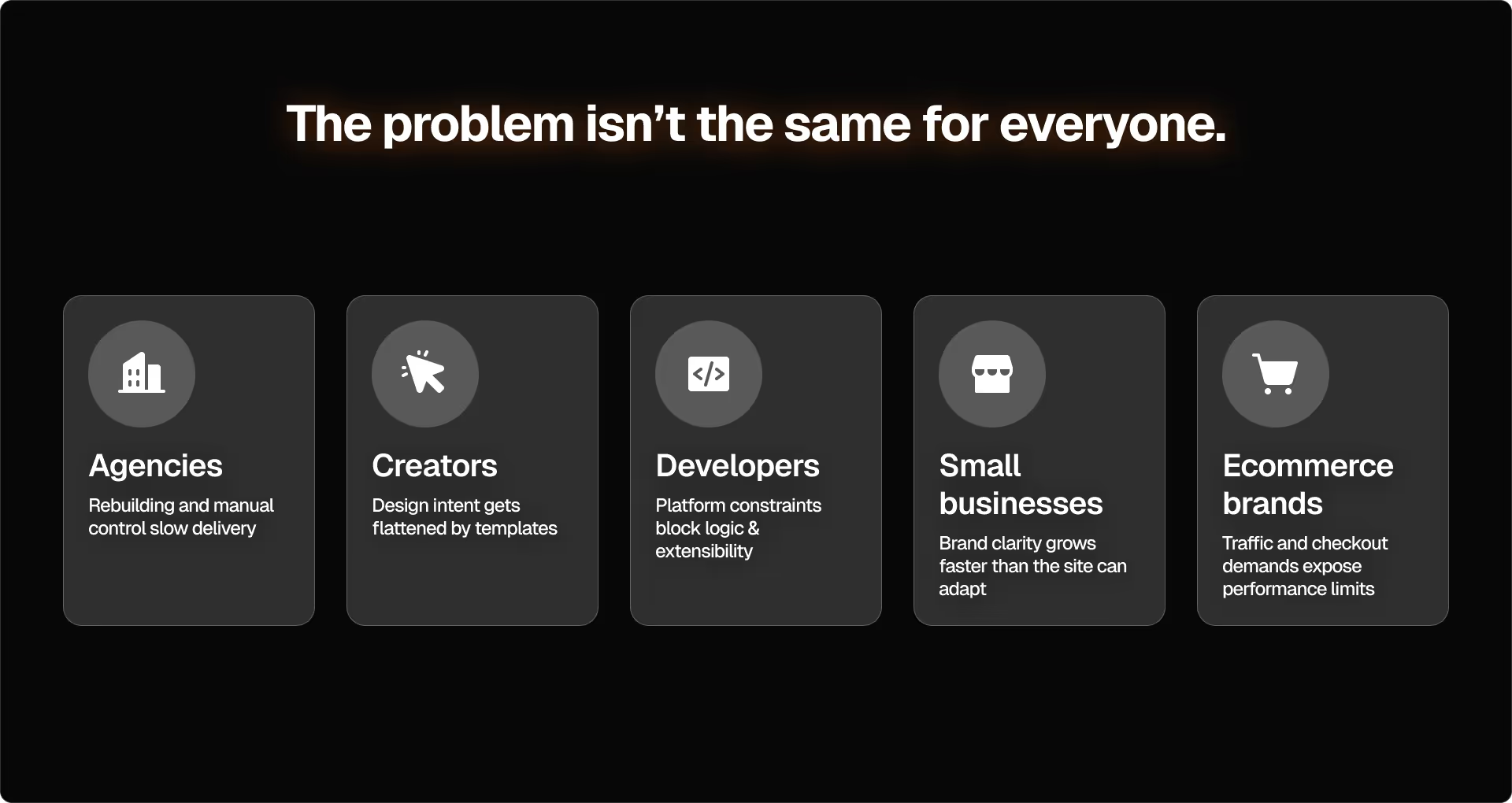
1. Small businesses that have outgrown “template mode”
There comes a time for small businesses when the brand grows. They can confidently say, “We know who we are now. Our website should reflect that.” A preset or template just doesn’t cut it. They want a system that feels uniquely theirs.
Real-world scenarios:
- Your offerings evolve but your website can’t reflect that speed - Your team has ideas to improve the website, but each change means manually rebuilding pages because the original structure wasn’t designed to scale.
- Your inbound leads feel random and unqualified - You’re adding more content, different forms, landing pages, and FAQs, but you’re still getting leads from the wrong people. That’s because the platform isn’t built to guide visitors through a thoughtful buyer journey.
When a small business reaches this point, here’s where they begin to recognize they need alternatives to Wix.
2. E-commerce brands preparing for real scale
When an e-commerce brand scales, it goes in five different directions at once: traffic → product lines → customer segments → operations → conversions. While Wix can handle early-stage pressure, it cannot ride out compounded pressure very well.
Real-world scenarios:
- Your marketing increases, but your checkout can't keep up – You run an influencer campaign, traffic rises, and suddenly, the website load time goes to 5 to 7 seconds. In e-commerce, that’s not an inconvenience, it’s a conversion killer.
- Cross-border growth hits a wall – Growing to multiple regions comes with different currencies, varied shipping rules and experiences based on geo location. When your storefront can’t evolve with you, the scenario gets uncomfortable, quickly.
It’s time to look into competitors of Wix when the revenue now depends on capabilities the platform can’t structurally support.
3. Agencies managing multiple brands or client sites
For an agency, a tool that multiplies output without multiplying chaos is gold. Just image managing 10+ client sites, shared components, frequent updates, and more. A platform built for modular systems and repeatability is key.
Real world scenarios:
- There’s lack of collab between your design and dev teams - There’s no proper version control, no multi-role workflows, and no structured component libraries. This leads to designers making changes, developers fixing something else, and clients editing and breaking a page. Eventually, it becomes a cycle.
- Scaling is impossible without modular systems – For an agency, reusable components, patterns, workflows, and systems are crucial for growth. With Wix, you must rebuild too much from scratch.
Agencies switch to Wix alternatives when they realise the platform slows down their delivery and eats into margin.
4. Creators who want complete artistic control
Typically, creators are happiest on Wix. Until they reach a time a point where they’re looking for designs that break the standard grids.
Scenarios creators actually face:
- Designs can’t be recreated - You design something unique in Figma, but the feeling or energy doesn’t reflect on Wix. Either the layout loses its depth or snaps into a rigid grid. The “feel” isn’t coming through.
- Your portfolio grows beyond the CMS - You’ve got tags, filters, multiple portfolio types, case study layouts, templates. Suddenly Wix’s CMS becomes restrictive.
Creators switch to Wix alternatives when their imagination starts running faster than the editor.
5. Developers who want more technical freedom
Developers look for alternatives to Wix when they move away from the simplicity of the platform and begin thinking in systems and not templates. Essentially something that’s more code-friendly or extensible.
Scenarios that push devs away:
- The platform forces elements, but you want to build components - Nothing updates globally. Everything has to be edited manually.
- Custom integrations become either impossible or unreliable - Whether it’s fetching data from APIs, adding logic, or building workflows, developers constantly hit “platform walls.”
Developers switch to Wix alternatives because the website becomes a constraint instead of a canvas.
10 Best Wix Alternatives for 2026
What matters is not choosing the most popular Wix alternatives. The best Wix alternatives really depend on what you’re trying to build next.
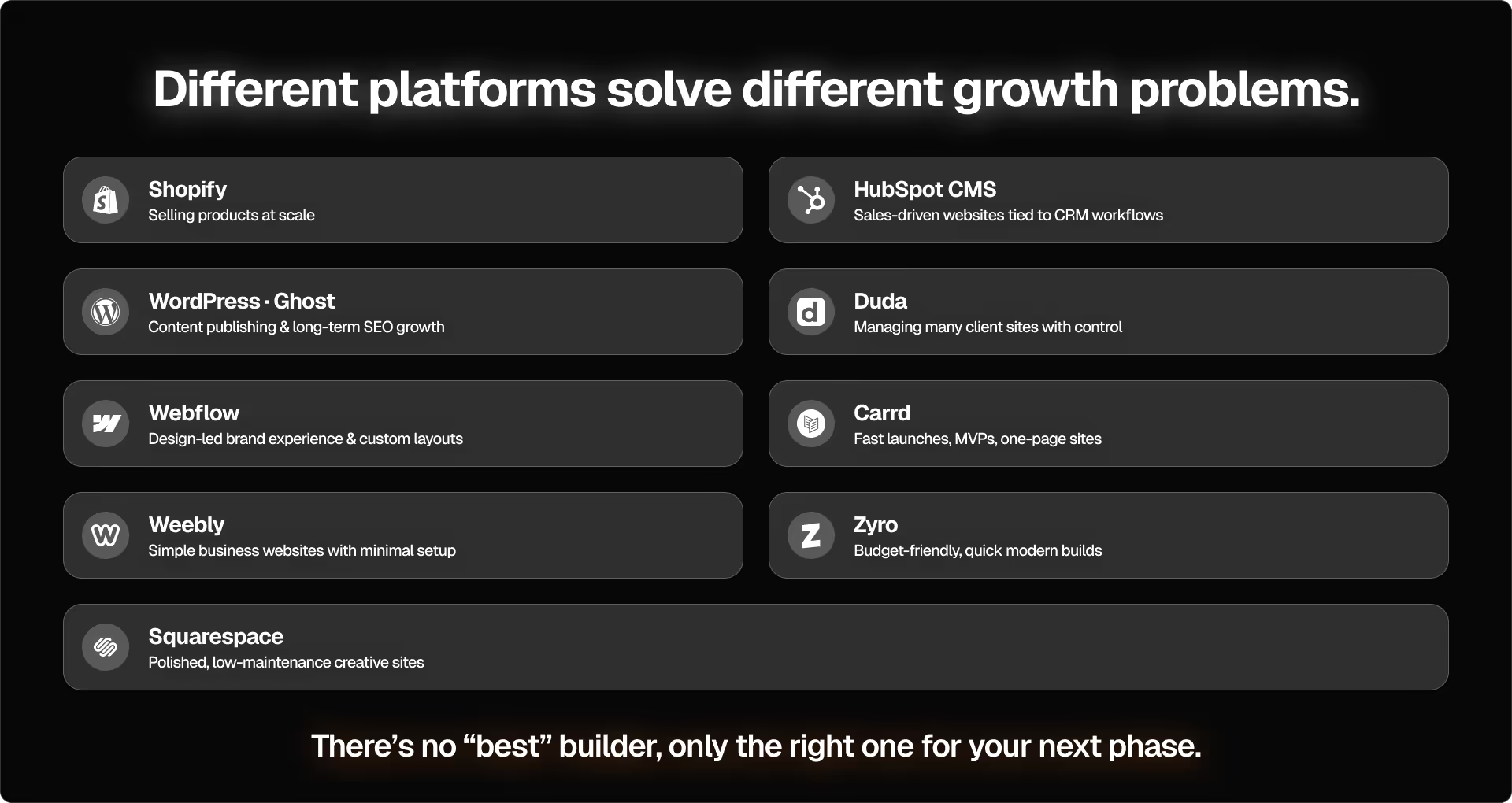
Here’s a list of top Wix alternatives based on what each is best at.
1. Webflow
What it’s great at: Allowing teams to build a layout that’s exactly the way you imagine, including structure, movement, and layout, without struggling with preset templates. The CMS works with you rather than having your content work according to your CMS. When you add more components or pages, the site stays stable.
Who it’s for: Teams with a solid brand identity, designers who care about the finer details, and businesses whose websites requires a custom feel because that’s how you show your value.
When you’d choose it over Wix: When templates start getting in the way of your ideas or when every new section feels like a compromise. Webflow matches your ambition instead of shrinking it so you’re not always trying to “bend” the editor to do things it wasn’t meant for.
2. WordPress
What it’s great at: WordPress is pro at handling large volumes of content**. Think** thousands of articles, several categories of content, custom post types, and structured SEO setups. It’s flexible enough to support content hubs, editorial workflows, gated resources, and anything a growing marketing team might need.
Who it’s for: It’s perfect for brands that rely heavily on organic search and frequently publish content. The CMS grows with your content roadmap.
When you’d choose it over Wix: When your website feels less like a brochure or landing page and more like a library. You need a CMS that’s built for long-term content operations rather than quick, occasional updates.
3. Shopify
What it’s great at: Even with traffic spikes, Shopify is excellent at ****reliable checkout, handling inventory, subscriptions, bundles, upsells, automation, and everything that affects conversion and repeat purchases. Every part of the platform is designed for selling and scaling, not just displaying products.
Who it’s for: D2C companies, retail brands or any business that cares about performance, stable workflows, and a storefront that won’t slow down when traffic spikes.
When you’d choose it over Wix: When your store goes beyond aesthetics and into scale. Meaning, more than simple product listings, you need deeper logic to increase AOV and lower operational effort.
4. Squarespace
What it’s great at: Squarespace gives you modern templates that look like they’re designed by professionals. Editing is simple, layouts remain consistent, and the site gives a polished feel, even when you make big changes, without needing endless adjustments.
Who it’s for: Personal brands, artists, photographers or anyone that wants their website to look clean and professional without spending hours adjusting spacing, grids, or responsive behaviour.
When you’d choose it over Wix: When you don’t need the flexibility or structure of more advanced builders and just looking for minimal setup that you can maintain effortlessly.
5. HubSpot CMS
What it’s great at: HubSpot allows you to connect the website CRM data, nurturing flows, lead scoring, and analytics. This way your content, forms, and sales workflows all live in one place, resulting in fewer integrations and simpler handoff between teams.
Who it’s for: B2B companies, SaaS brands, and organizations with dedicated sales teams that rely on behavioral data and high-quality leads.
When you’d choose it over Wix: When you don’t want your leads to end at the form and go straight into a sales pipeline. Over and above visibility, HubSpot supports qualification, nurturing, and revenue.
6. Duda
What it’s great at: With the help of reuseable components, client permissions, locked sections, and controlled editing, Duda helps agencies build and maintain websites easily and quickly. It keeps delivery predictable by reducing the common problem of “client broke the page again!”
Who it’s for: Agencies and freelancers that manage multiple projects and brands with high volumes where speed, consistency, recurring updates and an organized setup are essential.
When you’d choose it over Wix: As your workload increases, you want fewer surprises, speedier updates, and a reliable system. Duda supports that.
7. Ghost
What it’s great at: Ghost completely focuses on publishing. From long-form content to sending newsletters to running memberships, it cuts out the visual noise so writers can produce and distribute content without any friction.
Who it’s for: Media teams, creators, newsletters, founders building authority, and any brand for who writing is the primary driver of growth.
When you’d choose it over Wix: When the value of your website focuses more on words than design, then this is a space built for just that.
8. Carrd
What it’s great at: It cuts off the hassles of a full website setup and lets you publish clean, modern single-page sites, like waitlists, MVPs, announcements, link-in-bio pages, in minutes.
Who it’s for: Founders testing new ideas, early-stage startups, creators launching something small, or teams that need temporary pages minus the technicalities.
When you’d choose it over Wix: When speed matter more than scale and you want something out the door today, not after a full design cycle.
9. Weebly
What it’s great at: Weebly is ****great at giving you a website **** that doesn’t need technical knowledge. It doesn’t surprise. Things are straightforward with basic SEO, editing and simple layouts.
Who it’s for: Those who want an online presence with low-maintenance and occasional updates like local businesses, freelancers.
When you’d choose it over Wix: When you don’t want the pressure of endless customization or too many features and the clarity and ease in a fuss-free way.
10. Zyro
What it’s great at: Zyro is approachable, simple, quick to setup with modern templates. It comes with AI-driven suggestions for copy and layout, a bonus.
Who it’s for: Best for new founders, hobby projects, or testing ideas before investing in a bigger platform.
When you’d choose it over Wix: Rather than focusing on customization, expansion or technicality, you want a website up and running quickly and with the fewest dollars,
Wix vs. Top Competitors: Side-by-Side Comparison
Here’s a quick comparison of Wix and Wix alternative for easy comparison.
Note: Platform capabilities evolve constantly. This comparison reflects strengths that are widely observed and limitations as of 2026 but may vary depending on your specific setup and use case.
How to Choose the Right Wix Alternative
By now it’s clear, every platform solves a different kind of workflow problem. So, the best choice comes from understanding your internal habits, not the tool’s marketing page.
Here’s a simple way to approach it:
1. Map how your website is used day-to-day
Do you publish content frequently?
Do you update pages often?
Do you run campaigns every few weeks?
Or do you touch the website only when it’s required?
While a comparison table will guide you, the answers to these questions will give you more clarity on the best Wix alternatives.
2. Identify which part of your website slows you down the most
Don’t just pick the one that annoys you, but the one that truly creates friction.
For some teams, it’s publishing, for some it’s editing, and other it’s checkout, load time, or integrations.
The alternatives to Wix you pick should eliminate that bottleneck and not add new conveniences around it.
3. Choose based on your next 12 months, not your current setup
A website is a moving system. The decision you make should match where you want to be a year down the line, not what you want it to look like today. This removes the classic mistake of switching from one limitation straight into another.
4 .Consider the skills you already have (or plan to have)
Does your team have or plan to have designers? Then choose something flexible.
What about content editors? If yes, pick a CMS that’s built for volume.
Is your focus sales workflow? Then choose something that supports them natively.
If you have no one trained technically, the best option is simplicity over features or power.
A platform is only “easy” when it fits the skills your team brings to it.
5. Think about how much control you actually want
Not every team wants to manage hosting, wants plugins, wants templates or deep customization.
Pick what you need. This is the part most teams skip but it’s what determines whether a tool feels like freedom or extra work.
Ashok tell’s you the simplest way to decide: Pick a Wix alternative that reduces effort for the team that touches the website the most. That’s the platform that will age well.
Before You Switch Platforms, Ask This One Question
If you leave your website as it today for the next year, will your business go on comfortably?
If yes, you don’t need Wix alternatives just yet. If you answered ‘maybe’ or ‘no’ then perhaps it’s time for a switch.
The goal here isn’t to just to move away from Wix, but to pick a system, which your business and team can depend on week after week.
At this exact moment, Pixeto can help you map the right platform, rebuild the site, and migrate safely without losing SEO or momentum.
Because the right website shouldn’t feel like a project you manage, it should feel like something you trust.
FAQs
1. What is the best free alternative to Wix?
Carrd offers simple, one-page websites and is a free option to get online quickly. But if you’re looking for something more traditional with free tiers, Weebly and WordPress.com give you basic version that let you build and publish at no cost. Free plans typically include platform branding and don’t allow custom domains.
2. Which website builder offers the best SEO tools in 2026?
With SEO control, WordPress continues to lead as it offers flexible structure and a solid plugin ecosystem like RankMath or Yoast. Webflow is equally good, especially with technical SEO.
3. Can I migrate my Wix website easily?
Yes, it’s easy to migrate from Wix, but the level of easy depends on the way your website is built. Typically, you can use export tools or manually move content like pages, images, text. What’s tricky is SEO redirects, design structure, and dynamic content.
4. Which Wix alternative is best for ecommerce?
If selling is the primary function of your business, Shopify is your best bet. Stores that are content-rich or depend on heavy editorial or multi-language needs can pick WordPress.
5. Which platform is best for designers or agencies?
Agencies and designers who want true visual control and repeatable systems, the standout option is Webflow. It allows you to build designs that teams can reuse without breaking layouts. Another option is Duda, which allows agencies to manage multiple client sites thanks to permissions, reusable components, and client-friendly editing workflows.
6. What is more customizable than Wix?
Webflow, WordPress, and Shopify are more customizable than Wix. With Webflow there’s full control over layouts, interactions and CMS structure without forcing content into templates. WordPress comes with themes, builders, and plugins that make it flexible and apt for customization. With selling, Shopify is great and comes with checkout flows, and store automation, which matters when ecommerce becomes more complex.
7. Is Wix still worth using in 2026?
Absolutely, if it caters to your website and business needs. It’s an excellent choice for many early-stage sites, simple business websites, or portfolios. The only time you need to think of a Wix alternative is when you need more complexity with workflows, content volume or selling logic. For many solo creators or small brands, it’s still a great tool in 2026.
8. Which alternative is fastest for performance and speed?
If you’re only considering raw performance like fast load time, clean code and efficient SEO, then Webflow performs the best. WordPress can also be fast, but its performance depends on hosting and optimization choices.



_%20Profitable%20%26%20Micro%20SaaS%20Ideas.png)
.svg)

